Operation
In use by customers after completed Hyper-V projects and actively developed further.
Hyper-VGroupManager
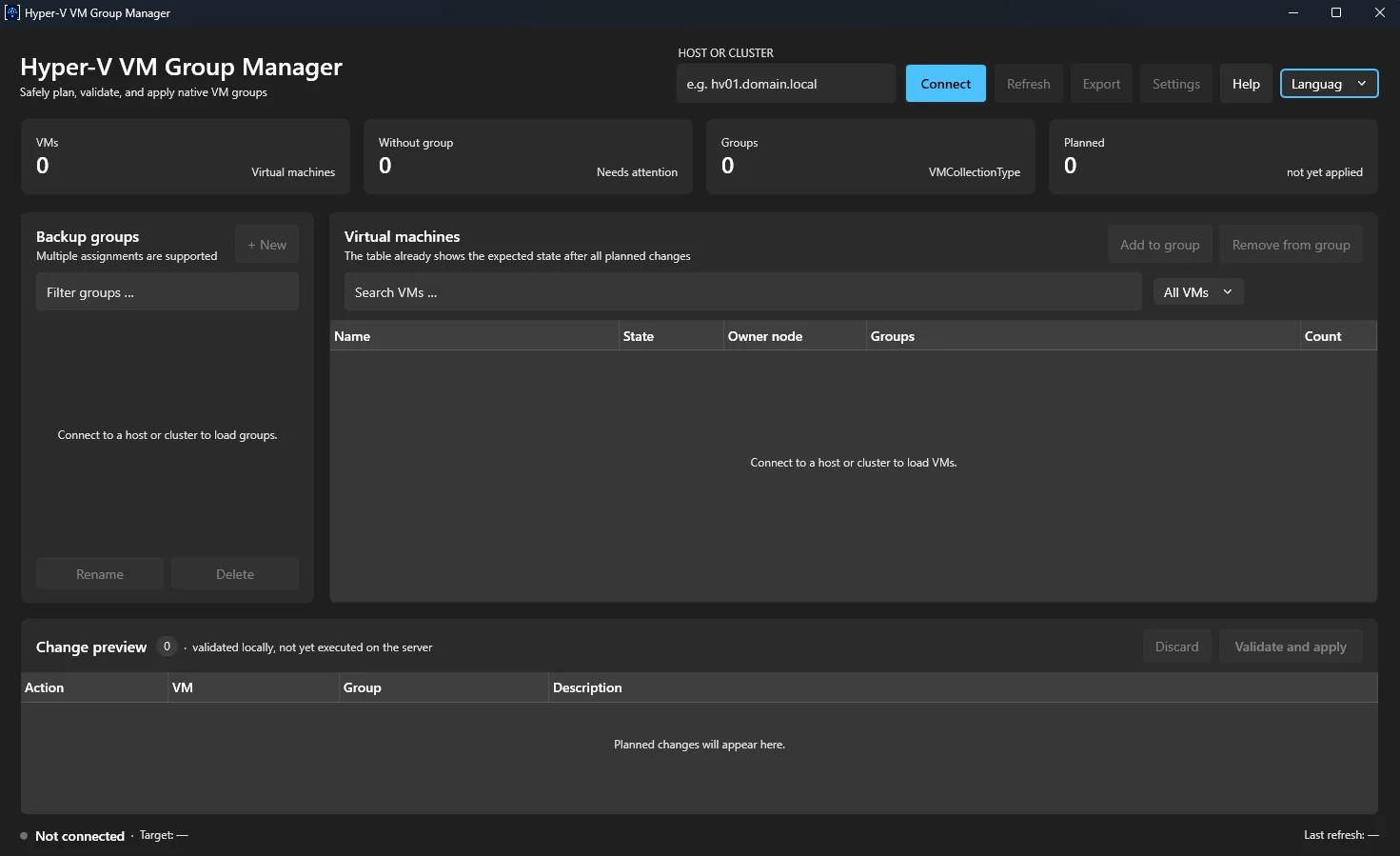
A portable Windows application for managing native Hyper-V VM groups on standalone hosts and failover clusters. Changes to groups and memberships can be staged, validated and reviewed as an expected state before they're applied to Hyper-V.
- Role
- Concept · Architecture · Development
- Disciplines
- Software Engineering · Infrastructure Engineering
- Technologies
- .NET 10 · C# · WPF · MVVM · PowerShell · Hyper-V · xUnit
01
Groups instead of a static VM selection
Hyper-V has native VM groups (VMCollectionType), but no management interface comparable to vSphere tags or Nutanix categories — day to day, they stay mostly accessible through PowerShell. Hyper-VGroupManager was built as a portable interface for managing these groups in a structured, traceable way.
A VM can belong to multiple groups at once. Changing one group doesn't automatically overwrite its other existing assignments — a behavior reminiscent of how vSphere tags or Nutanix categories work, without technically replicating those systems.
One important use case is using these groups as stable VM selection objects for Veeam Backup & Replication. Hyper-VGroupManager doesn't modify Veeam jobs or any other Veeam configuration in the process — it manages only the underlying native Hyper-V groups.
02
Separated into interface, domain logic and backend
The application is deliberately split into three areas. The state model, validation and change logic live in Core, independent of WPF and PowerShell; the PowerShell backend communicates with the application through a clearly defined JSON contract.
HyperVGroupManager.App
A WPF application with views, view models and services following the MVVM pattern (CommunityToolkit.Mvvm). The view models talk only to interfaces from Core — never directly to PowerShell.
- Views and view models
- MVVM with CommunityToolkit.Mvvm
- Implements IHyperVGroupService and IPowerShellExecutor from Core
HyperVGroupManager.Core
Models, interfaces, validators, the change queue and effective-state calculation — with no dependency on WPF or PowerShell.
- Domain logic and validators
- Change queue and effective-state builder
- Fully testable without any UI or PowerShell dependency
HyperVGroupManager.PowerShell
A standalone PowerShell module for Hyper-V and failover clustering on Windows PowerShell 5.1, with no dependency on C#.
- Hyper-V and failover cluster access
- Communicates exclusively through JSON on stdout
- Could in principle be swapped out without touching the UI or view models
Because the interface only talks to interfaces from Core, the PowerShell backend could in principle be replaced without reworking the UI and view model logic.
03
Plan first. Then apply.
Changes aren't executed immediately. They first land in a change queue; from the current Hyper-V state plus the staged changes, the application calculates the expected state before anything is executed.
- 01
Plan
Create, rename or delete groups, and add or remove VMs from groups — all staged in the change queue first. A newly planned group can already be assigned VMs within the same change set.
- 02
Review
Groups, memberships, member counts, VM filters and export already show the expected state. Preflight validation checks the full run before anything is written to Hyper-V.
- 03
Apply
After validation, the application applies the changes in a sensible order (create groups, rename, add members, remove members, delete groups) and correlates every backend response with the change that was sent.
Redundant or conflicting changes are handled sensibly: adding and removing the same membership cancel out, as do creating and deleting a group that hasn't been applied yet, and renaming a group repeatedly collapses to the most recently planned name. The application is therefore not a thin PowerShell wrapper, but has its own state and change model.
04
Safety boundaries
Because the application writes to production environments, its boundaries are deliberately narrow.
- 01Native VMCollectionType groups only — no Veeam API, no changes to Veeam jobs
- 02No Invoke-Expression and no dynamically composed PowerShell commands
- 03Parameters are passed exclusively through JSON files, never through command-line arguments
- 04An allowlist of permitted backend commands in the PowerShell bootstrap
- 05The full change set is validated before every write, both in C# and in the PowerShell backend
- 06Every backend response is correlated with the change that was sent
- 07Pending changes are bound to the currently connected target; switching to a different host or cluster is blocked
If the application can't reliably determine the target system's actual state after a failed operation — after a timeout, a transport error or a crashed process, for example — further writes are blocked. Only a successful refresh lifts that lock again.
05
Functionality
Functionality is grouped into management, change control and operations.
Management
Connect to Hyper-V hosts and failover clusters, create, rename and delete VMCollectionType groups, and manage memberships.
- Standalone hosts and failover clusters
- Multiple memberships per VM
- Create, rename and delete groups
Change control
Every change goes through the change queue with an effective-state preview, preflight validation and a controlled apply process.
- Change queue with effective-state preview
- Preflight validation before every write
- Safety lock on uncertain state
Operations
Search and filters, multi-select, JSON export and a scheduled email report for VMs without a group round out day-to-day use.
- Search, VM filters and multi-select
- JSON configuration export
- Scheduled email reports, with SMTP credentials protected via Windows DPAPI
- Integrated help via F1, with German/English at runtime
06
A desktop app, not an admin script
The current interface is built on WPF with Fluent design and follows system, light or dark mode along with Windows accent colors; the mode can be switched at runtime. Connection status, context-aware actions and empty states support day-to-day use, and staged changes are shown directly on VMs and groups as added, removed and renamed badges.
The application supports German and English, switchable at runtime without a restart; the choice is saved per user. Integrated documentation is available through Help or F1 and covers the quick start, security concept, email reports and troubleshooting.
The application is designed as a portable, self-contained Windows application. The .NET runtime can be bundled with it; actual Hyper-V management still requires the Windows Hyper-V PowerShell tools.
07
Testability and current status
The core domain logic can be tested automatically without a Hyper-V system. xUnit tests cover the change queue, validation, effective-state calculation, view models and the JSON contract, among other things; real Hyper-V operations deliberately remain part of manual smoke testing on a host or cluster.
The project is under active development. The current focus is on validation across different host and cluster environments, the release process, and further hardening of the administrative workflows.